Showing posts with label HTC. Show all posts

Simple Guide to Root Anroid with SuperOneClick

Simple Guide to Root Anroid with SuperOneClick

Android is the world's most popular operating system developed by google, mobile devices using the Android more and more popular and makes up 80% of the market. Root your phone and the Android device is one of the problems many Christians Android most search interest. Today freegamesforandroid would like to introduce to you a method root your Android phone with the process very simple and easy.
How to root android

What is Root Android?

Root phone is interpreted literally interventions directly into the computer system to gain full control, custom, change the root file of the operating system. Root needs to be done if you want to really master your equipment such as customizing optimize the function of the machine, Overclocking (increasing chip clock, GPU, etc.), install the ROM cook, additional features power or remove the default features for the manufacturer, install some applications that require root access (Titanium backup, SD maid, etc.).

The point to note as root:

Since Root is the direct intervention of the system, so a mistake can turn your smartphone into a "brick". So you need to make a careful process the Factory Recovery mode of the machine.

The Root your phone will also lose the warranty from the manufacturer due to arbitrarily interfere with the system. However with SuperOneClick root you can make Unroot process to return the machine to its original state and can provide warranty as normal, so you should remember to back up your data and applications to be able to serve back when needed.

Before performing the Root put the question to yourself if you really need to root the device? If the answer is yes then please follow the following steps:

Root Android smartphone using SuperOneClick:

Root Android smartphone using SuperOneClick

Performed root the following steps:
  1. Download the latest version of SuperOneClick 2.33 here, save it on your computer.
  2. Connect your phone to your computer via the USB port and turn on the "USB debugging mode". The same time un-mount the SD card.
  3. Now install the software SuperOneClick just downloaded. If you own a Samsung device select Samsung Captivate tab. Other devices selected Universal tab.
  4. Click Root and waiting, the process can take a few minutes to tens of minutes depending on the device. Ignore the warning and click OK in the activity log.
  5. After the root process is complete reboot the device and congratulations as Super User of the Android phone.
See video tutorial step-by-step how to root using SuperOneClick:

Some models have been tested successfully with SuperOneClick:


Root Anroid for Acer Liquid Metal

Root Anroid for Dell Streak

Root Anroid for HTC Magic (Sapphire) 32B

Root Anroid for HTC myTouch 3G

Root Anroid for HTC Bee

Root Anroid for LG Ally

Root Anroid for LG G2X

Root Anroid for Motorola Atrix 4G

Root Anroid for Motorola Charm

Root Anroid for Motorola Cliq

Root Anroid for Motorola Droid

Root Anroid for Motorola Flipside

Root Anroid for Motorola Flipout

Root Anroid for Motorola Milestone

Root Anroid for Motorola Pro +

Root Anroid for Nexus One

Root Anroid for Samsung Captivate

Root Anroid for Samsung Galaxy 551 (GT-I5510)

Root Anroid for Samsung Galaxy Portal / Spica I5700

Root Anroid for Samsung Galaxy S 4G

Root Anroid for Samsung Galaxy S I9000

Root Anroid for Samsung Galaxy S SCH-I500

Root Anroid for Samsung Galaxy Tab

Root Anroid for Samsung Galaxy 5

Root Anroid for Samsung Transform M920

Root Anroid for Samsung Vibrant

Root Anroid for Sony Ericsson Xperia X8

Root Anroid for Sony Ericsson Xperia X10

Root Anroid for Sony Xperia Arc

Root Anroid for Sprint Hero

Root Anroid for Telus fascinate

Root Anroid for Toshiba Folio 100

Amazon 'Bocorkan' Harga dan Tanggal Rilis HTC 8X

Ponsel Windows Phone 8 unggulan HTC yang diumumkan pekan lalu 8X, kini harga dan tanggal rilis pasarnya telah dibeberkan di sejumlah retail online.

Seperti diposting Amazon UK, HTC 8X versi unlock kini telah ditawarkan secara pre-order, dengan perkiraan jadwal rilis pada 8 November dan dibanderol setara dengan 863 USD.

Selain Amazon UK, menurut informasi yang kami peroleh dari situs Phonearena, disebutkan bahwa pengecer lain yang juga berbasis di Inggris yakni Expansys juga telah memasang HTC 8X versi unlock untuk pre-order dengan harga yang cukup masuk akal, yakni setara dengan 649 USD. HTC 8S yang digadang sebagai ponsel Windows Phone 8 kelas menengah, di banderol sekitar 365 USD.

Harga ponsel Windows Phone 8 besutan vendor asal Taiwan itu, seperti diposting oleh kedua pengecer tersebut memang belum merupakan harga resmi. Terlebih lagi, jika menilik harga HTC 8X yang diposting di kedua retail tersebut memperlihatkan selisih harga yang cukup mencolok.

Namun begitu, mengingat HTC 8X sebagai ponsel Windows Phone 8 unggulan yang siap bersaing laungsung dengan Nokia Lumia 920, diharapkan kedua smartphone ini dibanderol dengan harga bersaing. Berdasarkan ‘bocoran’ yang diperoleh dari beberapa situs retail di Cina harga Nokia Lumia 920 disebut-sebut setara dengan 515 USD.

Sebagaimana diketahui, ponsel Windows Phone 8 sendiri diperkirakan baru akan dirilis ke pasar setelah Microsoft resmi merilis platform terbarunya itu pada akhir Oktober. (Ozi)


Sumber : http://www.tabloidpulsa.co.id | Kumpulan Informasi Menarik  | Foto : HTC 8X
Tags : Techno, Gadget

HTC's first Windows Phone 8 smartphones - HTC 8X, 8S


HTC on Wednesday unveiled two smartphone models running Microsoft's Windows Phone 8 operating system and said the devices would be available in November through more than 150 service providers in over 50 countries globally.

The two brightly coloured phones - the Windows Phone 8X and the Windows Phone 8S - will pit HTC directly against key Microsoft partner Nokia, which earlier this month also launched two colorful Windows phone models and also Samsung which recently unveiled the Aitv S, the first Windows Phone 8 smartphone.


Like Nokia, HTC is under a lot of pressure to generate strong sales from its next round of smartphones as it has lost significant ground to Samsung Electronics and Apple.
With Apple boasting 2 million pre-orders of its latest iPhone before it hits store shelves on September 21, Reticle Research analyst Ross Rubin said, it's going to be challenging for HTC to catch up.

However, HTC, which has generated most of its sales from phones based on Google's Android software in recent years, will be able to count on marketing help from Microsoft.

The new devices will be marketed as the "signature" Windows Phone 8 smartphones, Jason Mackenzie, HTC's global head of sales, told attendees on Wednesday at the company's New York launch event, where Microsoft Chief Executive Steve Ballmer also came on stage.

"Consumers are going to love these phones, and we're committed to reaching them in a manner that's clear and direct," Ballmer said.

The HTC Windows Phone 8X includes a 2.1mp, f/2.0 aperture, 88° wide angle front-facing camera, that also supports 1080p video capture. The 8X comes with an 8 megapixel rear camera and the 8S has a 5 megapixel sensor.

The HTC 8X has a 4.3-inch HD-resolution super LCD 2 and the HTC 8S' super LCD screen measures 4-inches. The 8X and 8S screens have Gorilla Glass protection.
Weighing 130 grams, the HTC 8X is powered by a dual-core 1.5 GHz Qualcomm processor. The phone has 1GB RAM and comes with 16GB of storage and an 1800 mAh battery. The comparatively lower speced and lighter at 113 grams, the HTC 8S is powered by a dual-core 1 GHz Qualcomm processor. The 8S has 512 MB RAM and has 16GB of internal storage and a 1700 mAh battery.

The Windows Phone 8X will come in California Blue, Graphite Black, Flame Red and Limelight Yellow colour options. The Windows Phone 8S by HTC will be available in Domino, Fiesta Red, Atlantic Blue and High-Rise Gray.

The success of HTC and Nokia Windows Phone 8 devices this holiday shopping season will be crucial to Microsoft, which has been left far behind by Apple and Google in the smartphone software market in the last several years.

Gartner analyst Michael Gartenberg said HTC and Nokia were smart to distinguish the appearance of their devices from iPhone with bright colors as it could make them stand out to customers who want an iPhone alternative.

"The best thing about these device ranges is that neither looks like an iPhone," said Gartenberg, who added that competition between Nokia and HTC will also help to generate some publicity around Windows Phone 8 software.

Carrier support
 
Taiwan's HTC was able to share more signs of success at its device launch event in New York than did Nokia at its phone launch here earlier this month.

While Nokia did not name any customers for its latest Lumia phones, HTC said that together its two new phones would go on sale at 150 operators in 50 countries around the world.

Until now, HTC has been betting on its One series of phones, but so far this year sales of those phones have failed to keep pace with the Apple's iPhone and Samsung's Galaxy range.

Up to the second half of 2011, when it suffered a sharp decline in its fortunes, HTC, a former contract smartphone maker, had build a strong brand around the world with phones based on Android software.

HTC saw its profit more than halve in the second quarter from a year ago. It also warned of a revenue decline of as much as 23 per cent in the third quarter from the previous three months due to macro softness and competition.

The smartphone maker is set to announce third-quarter results on October 5.

Source : ibnlive

How to Enable 3D on the HTC EVO 3D and Evo V whenever you want


For those of us who own an HTC EVO 3D, we tend to be hit, from time to time, with questions about our investments. Questions like, “why did Sprint take over a year to release something that was ready to go way before?” or “Will we be getting JB like the other devices that are getting it?” However, a question that more often than not plagues my mind as an owner of this device is, “Where else can I use the 3D display?” Being able to watch a few movies and play certain games in 3D is cool, but there should certainly be other things that can be done to take advantage of the panel technology—like a 3D interface, 3D wallpaper, and so on.

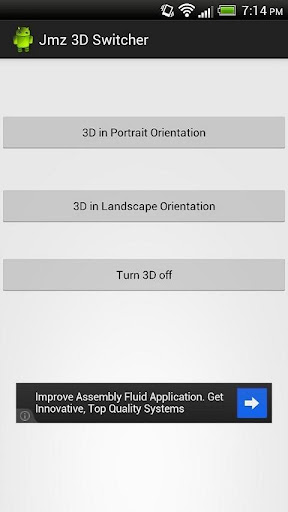
If you are thinking about these possible uses and more, here is a nice little app that will allow you to use 3D at all times during normal operation. Essentially, the app changes a value in the 3D panel controller, which turns it on and leaves it in that state. Due to rotation obviously being an issue with this (remember how the camera always complains whenever you try to take pictures while holding the phone vertically?), the app allows you to turn the 3D feature on either for landscape or portrait mode. The only one thing that can be somewhat cumbersome is that this app will render your light sensor useless and will boost and lock your brightness at 100%. This effect will go away as soon as you turn off the 3D functionality through the app.
So, if the idea of having actual 3D wallpaper makes you salivate, make sure that you try out this simple yet fulfilling app and leave some feedback for the dev.
 This app just echo’s a number in 3D_mode to enable complete device 3D. Either Landscape or Portrait.


Download link
JMZ Evo 3D - 3D Switcher

HTC Evo Design 4G (Sprint)

HTC Evo Design 4G (Sprint) | Android Best Phone

The good : The HTC Evo Design 4G has an understated black-on-black design, Android 2.3 Gingerbread, two cameras, and is a world phone. It comes with 8GB of memory preinstalled.

The bad : The stubborn back cover is hard to remove and the speakerphone could be better. A dedicated hardware shutter button wouldn't go amiss.

The bottom line : The HTC Evo Design 4G gives you a lot of smartphone for an excellent value--fast 4G speeds, a good camera, a strong processor, and a sophisticated design. It's an excellent choice for Sprint customers, except those who are specifically looking for a dual-core phone.


The fifth to join the Evo family, the HTC Evo Design 4G is a slightly smaller, more budget-conscious version of the classic Evo 4G and more recent Evo 3D, complete with the family's typical Sprint WiMax 4G speeds. It also has the distinction of being the first globe-trotting Evo, with a GSM-friendly SIM card slot hidden beneath the battery cover (and yes, it will only work overseas.)

HTC might have scaled back with the Design 4G, but that doesn't make it a mediocre phone by any means. The Android 2.3 Gingerbread device has a 1.2GHz processor, a 5-megapixel rear camera, a 1.3-megapixel front-facing camera, and comes with an 8GB microSD card right out of the box. It also has HTC's usual premium finishes and a price point that's hard to beat for all the goodies--just $99.99 with a two-year contract, after a $50 mail-in rebate. Yep, HTC's runtiest Evo is also its best value.

Design
HTC has an eye for design, and from the boxy to the curved, this cell phone maker knows how to make a pretty phone. The answer is yes, the Design 4G has earned its name. The Evo Design 4G pays homage to a lot of other HTC phones, with its boxy edges and wide metallic band across the back. There's also a soft-touch material above and below the band to create a black-on-black tuxedoed look. In fact, it's much more sharp and stylish than the Evo 3D. The Design 4G measures 4.8 inches tall by 2.4 inches wide by 0.47-inch thick and weighs 5.2 ounces (in contrast, the slightly larger Evo 3D stands 5 inches tall by 2.6 inches wide by 0.48-inch thick and weighs 6 ounces.) The size is very manageable and it feels great in the hand and fine on the ear.

HTC Evo Design 4G (Sprint)

The HTC Evo Design 4G is a smidge smaller than 
other members of the Evo family, but don't mistake it for a runt.


With the smaller stature comes a smaller screen, a 4-inch rather than a 4.3-inch display. It has a WVGA (960x540-pixel) touch-screen resolution, which isn't the most glorious out there, but it isn't at all bad either. In fact, it looks bright, sharp, and colorful--as it should with support for 16 million hues.

Android 2.3 Gingerbread is running the show backstage on the Evo Design 4G, but HTC's Sense 3.0 is all you see up front. I personally think HTC hit a home run with Sense, everything from its lush graphics to its carousel animation that quickly spins when you swipe your finger fast across the seven customizable home screens. 

On to the externals! Below the display are four touch-sensitive navigation buttons to go home, pull up the menu, go back, and search. Above the screen is the 1.3 megapixel camera lens. The right spine is bare; too bad, this would be a great spot for a physical camera shutter button. On the left you'll find the volume rocker and Micro-USB charging port. Up top are the 3.5 millimeter headset jack and the power button. On the back you get the 5-megapixel camera lens and the LED flash.


HTC Evo Design 4G (Sprint)
If you can pry off the back cover, you'll find a microSD card 
slot and the GSM SIM slot. Even the internals look chic.

One of the phone's most interesting hardware embellishments is beneath the battery cover, which was tough to wrench off. HTC has even managed to make the guts of the Design 4G look stylish, thanks to a partially transparent hinged ledge that snaps into place below the battery (it's also a structural element that keeps the battery in place. Flip it open, though, and you'll see the SIM slot where you can slide in a GSM SIM card if you take the phone overseas. It bears repeating that the Evo Design 4G will not work with a U.S. GSM SIM.

The microSD card slot is also here below the cover. The phone comes with an 8GB card pre-installed.

Features
Since phones are first and foremost about communications, let's start there. Android on the back end means that the Evo Design 4G lets you access your Google accounts; HTC also hooks in to Facebook contacts if you'd like. The phone supports groups and a host of details per contact. Plus, your available memory is the only limit to the breadth of contacts you can have.


HTC Evo Design 4G (Sprint)

Some extra finishing touches make the square, 
black Evo Design 4G more than just a black box.


It's a smartphone, so there's texting, multimedia messaging, e-mail, Bluetooth, Wi-Fi, and GPS on board. HTC Sense lets you access your contact list and messages directly from the lock screen. The Swype virtual keyboard is available, but not by default.

HTC Amaze 4G (black, T-Mobile) By. Android Best Phone

HTC Amaze 4G (black, T-Mobile) By. Android Best Phone

HTC Amaze 4G black T-Mobile

The good : The HTC Amaze 4G features a premium chassis, a sharp Super LCD touch screen, and a dual-core processor. It's equipped with an 8-megapixel camera with a number of advanced shooting modes and settings. T-Mobile's HSPA+ 42 speeds were impressive.

The bad : The smartphone is heavy and expensive. The camera still struggled in low-light environments.

The bottom line : The HTC Amaze 4G is a beautifully designed and fast Android smartphone, with some advanced camera features, but don't go ditching your point-and-shoot camera just yet.

It was only four months ago that T-Mobile and HTC released the MyTouch 4G Slide, touting the Android handset as having the most advanced camera of any smartphone, but it appears the Slide's reign was shortlived. Now, the new HTC Amaze 4G holds that claim to fame, bringing some new tricks to help create and highlight the best images. On top of that, the Gingerbread-based phone boasts a dual-core processor, a gorgeous Super LCD touch screen, and impressive data speeds. All of this makes the Amaze 4G one of T-Mobile's best Android smartphones, but it comes at a cost. The HTC Amaze 4G is priced at $259.99 with a two-year contract and after a $50 mail-in rebate. Is it worth it?

Design
Weighing in at 6.1 ounces and measuring 5.12 inches tall by 2.58 inches wide by 0.46 inch thick, the HTC Amaze 4G is a good chunk of hardware. In fact, the first thing we noticed when we picked up the device was its weight. It's one of the heftier handsets we've seen in a while, but as with most things, we got used to it with time. Plus, with its metal construction and soft-touch finishes, the Amaze is definitely one sturdy handset.

HTC Amaze 4G black T-Mobile


The HTC Amaze 4G is beautifully designed, but it's on the heavier side.

The second thing we noticed is the Amaze 4G's display. The 4.3-inch qHD (960x540-pixel resolution) Super LCD touch screen is quite eye-catching. Text and images looked crisp and sharp on the bright screen. The screen's large size also makes it great for viewing Web pages and video. The Samsung Galaxy S II's Super AMOLED Plus display shows off more saturated colors and has slightly better contrast, but we were still very happy with the Amaze's display. The touch screen was responsive and features a built-in accelerometer, pinch-to-zoom support, and a proximity sensor. Note that it only comes preloaded with HTC's virtual keyboard, but it does offer Swype-like functionality (HTC calls it Trace) so you can drag your finger from key to key for quicker input.


HTC Amaze 4G black T-Mobile


One of the smartphone's key features is the 8-megapixel camera.

Below the screen, you get your usual Android controls: home, menu, back, and search. On top, you'll find a power/lock button, while the Micro-USB port is located on the left spine. The right side features a volume rocker, a camera button, and a dedicated video button. Holding down the video button activates the camera in video mode. You can also launch the camera right from the lock screen by either doing a long press on the camera button or dragging the camera shortcut to the center ring (see the user interface section below for more). In addition to the 8-megapixel camera and dual-LED flash on back, there is a front-facing 2-megapixel camera just above the display in the upper right-hand corner.

The HTC Amaze 4G comes packaged with just the basics: an AC adapter, a USB cable, and reference material.

User interface
The HTC Amaze ships with the Android 2.3.4 Gingerbread operating system and the HTC Sense 3.0 user interface. First appearing on the HTC Sensation 4G, the latest version of Sense offers a number of enhancements, many of which can be found on the lock screen. Aside from a display of the date, time, and other vital statistics, you now get shortcuts to four of your favorite applications. By default, the shortcuts are set to phone, mail, camera, and messages, but you can change them in the phone's Personalize menu. To open a specific app, you can simply drag the icon to the ring at the bottom of the screen, instead of having to unlock the phone first.

In addition to the shortcuts, HTC wanted the lock screen to showcase more user content, so now you can personalize the screen with your photo gallery, friend stream, favorite stocks, or weather. The content then floats by or flies by (depending on which option you choose) onscreen.

Once you unlock the phone, you'll find even more improvements. For example, the home screen features a 3D carousel so you can more quickly flip through the seven home screens, rather than swiping through each panel. (Of course, you can also use the Leap screen function.) The pull-down notification tray has a second tab called Quick Settings where you can manage your wireless connections and access other settings. The mail app and widget now give you a preview of each message, and the photo gallery widget features a flip-board effect.

It would be nice if there were the capability to remove some of the home screen panels as on the HTC Rhyme, but it's not a big deal.

Camera
The HTC Amaze 4G's 8-megapixel camera offers many of the same features as the MyTouch 4G Slide's camera, and adds several new tricks. This includes a new shooting mode called SmartShot, which takes a series of pictures and combines elements of each in an effort to create that perfect picture of everyone smiling. So for example, if one person's eyes are closed in one shot but open in another and another person is smiling in the first shot and only half-smiling in the next, the final image should show one of everyone showing their pearly whites with open eyes.

Also new is the Perfect Pics gallery feature that takes the top 10 percent most technically correct photos from your camera roll and automatically combines them in a separate album. A photo that meets a number of predefined parameters (such as for lighting levels, colors, and contrast) is considered to be Perfect Pics material, though you can manually add photos to and remove them from the Perfect Pics gallery as well. You can share these photos or view them in a slide show, as you would with any other image in your photo gallery.

In addition to these new capabilities, the camera continues to offer a backside-illuminated sensor (BSI) for better low-light performance, and ClearShot HDR, SweepShot (panoramic), and Burst shooting modes--all of which were introduced on the MyTouch 4G Slide.

HTC Titan Review By Android Best Phone

Android Best Phone >>HTC Titan Review 

Android Best Phone : Rarely does a gadget’s name quite so well describe its nature, as is the case with the HTC Titan. A huge 4.7-inch display packed into a battleship-strong metal chassis, the TItan is an unapologetic slab of Windows Phone 7. Question is, can Mango provide sufficient sweetness to balance the Titan’s brutal charms, or are HTC’s big ambitions in for an equally big fall? Check out the full SlashGear review to find out.


Hardware
We can’t fault HTC’s industrial design or build quality: the Titan is one of the company’s most cohesive, solid handsets of the past year. The matte-finish black metal casing and bevelled toughened Gorilla Glass fascia come together beautifully, and the various logos and branding are discrete and thankfully chrome-free. If the Sensation XL – the Titan’s Android-based equivalent – is the attention-seeking cousin then the Titan is the reserved, more timeless family member.

It’s undoubtedly a large phone – 131.5 x 70.7 x 9.9 mm and 160g – but the combination of curves and angles in the sides mean it fits into average sized hands reasonably well. Physical controls are limited to power/standby on the top edge – alongside a 3.5mm headphone jack – then a volume rocker and a camera shortcut on the right edge, along with the touch-sensitive back, Start and search keys under the display. A microUSB port does charge and sync duty on the lower left edge, and you get two cameras: 8-megapixels on the back and 1.3-megapixels on the front.

Inside there’s a 1.5GHz single-core processor, 50-percent faster than the original HTC HD7, paired with 512MB of RAM and 16GB of onboard storage (of which 12.63GB is user-available). Microsoft still refuses to allow expandable memory, so that twelve gigs and change are your lot, too. Connectivity includes triband UMTS/HSPA (up to 14.4Mbps downloads and 5.76Mbps uploads, network permitting), WiFi b/g/n and Bluetooth 2.1+EDR, while the usual bevy of sensors – GPS, gyroscope, G-sensor, digital compass, proximity and ambient light – are all onboard.

No NFC – there’s currently no Windows Phone support for it anyway – and no FM radio, but the only lingering frustration is the absence of 1080p Full HD video recording. The 8-megapixel camera is limited by the processor and software, and as such 720p is all you’ll squeeze out of it.

Display
Titan is an apt name when you consider the size of the display. Under that slab of toughened glass is a 4.7-inch Super LCD panel, the largest on an HTC Windows Phone handset so far, and in fact making the Titan the biggest phone running Microsoft’s platform.

It’s a bright screen with decent viewing angles and the colors look great, but the resolution is a disappointment. Windows Phone currently limits support to WVGA, which means despite the Titan’s potential for packing in the pixels, you’re actually stuck with 800 x 480. Considering qHD is already becoming the benchmark of sorts for high-end Android smartphones, that the iPhone has had 960 x 640 since the original iPhone 4, and we’re now seeing high-end Samsung and LG handsets with 1280 x 720 displays, on paper it’s easy to dismiss WVGA.

That would be premature, though. No, it may not have as many pixels as rivals, but the Titan does a fair job with what’s on offer. The biggest issue is fonts, with some crunchiness or fuzziness around the edges noticeable in places, emphasized by Windows Phone’s starkly minimal UI. Our main frustration is the sense of wasted potential: with the same resolution as the smallest Windows Phone on the market, you’re getting no more emails, homescreen tiles or app graphics in view at any one time. They’re just stretched bigger.

Software and Performance
The HTC Titan runs Windows Phone 7.5 Mango, Microsoft’s latest update to its smartphone OS and the biggest single change to the platform since it debuted a year ago. We’ve already reviewed Mango comprehensively, and it’s worth reading our full coverage to get up to speed with where Microsoft’s software holds up and where it still shows its naivety.

Windows Phone 7.5 Mango Review:
In terms of modifications and tweaks, HTC is more limited in its options than on its Android range. The Titan gets the HTC Hub, the company’s corralled collection of weather animations, news, stock updates and some promoted app downloads, while Photo Enhancer, Connected Media, Locations, Notes and HTC Watch are all preloaded.

It’s the latter which will probably be the big draw for Titan buyers, the oversized display working well with HTC’s streaming media service. Unfortunately, unlike with the HD7, there’s no flip-out kickstand to prop the Titan up for hands-free viewing. Third-party software through the Windows Phone Marketplace remains a sparser selection than for Android or iPhone, though there are official Twitter and Facebook apps which are at least two important boxes ticked for consumer appeal.

Performance from the 1.5GHz processor is slick, with menus and lists scrolling lag-free, image and webpage pinch-zooming smooth and no issues with the speed at which apps and webpages load. Mango brings its own performance improvements too, and the combination of software refinements and the boosted processor add up a device that had trouble handling whatever we threw at it. Microsoft has said it is confident that Windows Phone on a single-core is just as fast as rival platforms on dual-cores, and right now that doesn’t seem too unbelievable.

Camera
HTC’s cameras have been hit and miss in recent months, with some handsets offering excellent stills and video – like the myTouch 4G Slide, for instance – and others proving less impressive. The Titan’s 8-megapixel backside illuminated (BSI) sensor, paired with an f2.2 wide-angle lens and dual-LED flash, falls in happily among the better of the company’s offerings.

Windows Phone offers a small range of options, including some basic special effects, and there’s a new Burst Mode that fires off multiple frames in rapid succession so that you can pick the best. Face detection and tap-to-focus work as expected, and the two-stage camera shortcut button – press halfway to lock focus, fully to fire off the shot – is useful if a little too high up the side of the phone to be entirely easy to press without stretching your finger.

The end result are clear, color-rich but reasonable accurate stills, with the Titan grabbing shots quickly after you hit the button and Windows Phone neatly filing them off to the side of the screen so you can keep shooting. Best results are, unsurprisingly, in daylight, though the Titan can get washed out with particularly bright scenes. Low-light performance is only fair, with the BSI sensor doing a better job than other phone cameras we’ve seen but still lacking the dusk/night skills of a dedicated camera. The dual-LED flash is bright but that can add up to overpowering at times, with closer subjects washed out and the background cast into murky gloom.

The front-facing camera may offer 1.3-megapixels, up from the VGA resolution on many rival devices, but it’s still better suited to impromptu video calls – at least if there was a way to make them, since Windows Phone lacks a native app for that – than stills.

As for video recording, while Full HD would be nice we’re limited to 720p on the Titan. Continuous focus and stereo audio recording are both options – the former on by default, the latter off – and happily there’s now a “save settings” option which locks your choices in. Previous Windows Phones would reset you back to the VGA quality option (as well as lose any other settings changes you’d made) each time you reopened the camera app.

Phone and Battery
Voice calls on the Titan proved solid, with little in the way of hiss or fizz, and the earpiece cranks up to suitably booming levels. The speakerphone, meanwhile, is impressively loud though – unsurprisingly – trades volume for clarity at the top end. The Titan seemed reluctant to display as strong a WiFi signal as Android devices on the same wireless network, but had no problems actually maintaining the connection in our experience.

HTC suggests users will see up to 410 minutes 3G talktime (up to 710 minutes GSM) or up to 460 hours 3G standby (up to 360 hours GSM) from a single charge of the replaceable 1,600 mAh battery. Given the big screen and the faster processor, we expected the Titan to get breathless midway through the afternoon, but the smartphone surprised us with its longevity. Despite internet use, voice calls, push email being turned on, some photography and use of Bing Maps, we still reached the end of the day without seeing a battery warning.

Wrap-Up
The Titan is a phone of surprises. The big display leads you to expect a similarly impressive resolution, but HTC doesn’t deliver that; on the flip-side, it also leaves you cautious about battery life, but the Titan had no trouble there. Windows Phone is still a relatively new OS, but with the Mango update it’s already impressive. We know some still aren’t keen on the pared down UI, but Microsoft’s design language is consistent and a welcome change from what quickly seem over-stylized competing platforms.

Unfortunately the Windows Phone Marketplace is still a corner store to its rivals’ superstores, and that shortage of apps remains a turn-off to many. That, and the fact that the Titan may simply be, well, too titanic for some are the biggest issues HTC faces. Still, the company offers the smaller Radar if big isn’t your idea of beautiful.

Those willing to grapple with the Titan, however, will find plenty to like. Build quality is second to none, the display delivers for multimedia and the camera is certainly one of HTC’s best. Windows Phone, meanwhile, remains the smartphone wildcard, but we wouldn’t doubt Microsoft’s commitment to it. Things will see another shake-up when Nokia unveils its first Windows Phones later this month, but until then the HTC Titan takes a place very near the top of the pile.

Another Articles : Android Best Phone

HTC Incredible >> HTC Incredible S Review

HTC Incredible S Review

HTC Incredible

HTC Incredible : In this HTC Incredble S Smart Phone review, the smartphone under the spotlight is HTC Incredible S. Although judging from the name you may think it's a simple upgrade to the HTC Incredible, well think again. This phone is a power house of its own and this HTC phone review will tell you why.

The HTC Incredible S is powered by a Qualcomm MSM 8255 1GHZ processor with the aid of a 768MB RAM and an Adreno 205 GPU. Although it doesn't come with a dual core processor, this phone coupled with the Android just takes you on a jolly ride, every time.

The 120 x 64 x 11.7 mm phone that weights about 135.5g comes with a 4-inch screen that really caught our eyes and is definitely worth a mention in this HTC phone review. The 800 x 480 pixel WVGA touchscreen is great as the colors are kept vivid and clear even as we view the screen from various angles. In the front there's also the cool rotating buttons that keeps up as you turn the phone into landscape mode together with the 1.3-megapixel camera. On the left of the HTC Incredible S, you will find the volume controls as well as the microUSB port. Running on the Android v.2.2.1 is definitely a letdown especially since many other smartphones in the market run on Gingerbread.

However, word is that the phone will get the Android 2.4 update. The latest version of HTC Sense on the phone seems to make up for the Android shortcoming on the HTC Incredible S. There's a bunch of cool stuff waiting to be explored at the HTCSense.com site like the remote access functionality that it provides to access your contacts and other things.

As every other HTC phone review, we looked into the phone performance of the HTC Incredible S. Making voice calls was pretty good on this phone as the audio was both clear and noise free. Surfing the internet was also a good on this phone as you can do things like scroll and zoom web pages quickly with little or no delays. The Mobile Hotspot app that comes with the phone is a bonus too as you can share your 3G connection with others. The 1450mAh battery seems to provide sufficient juice for this phone to run for at least a day without needing a recharge.

The HTC Incredible S has really good cameras as both cameras do well in reducing noise. With that said, the image quality is amazing. Adding on to that, the waiting time between shots is hardly there while focusing speed is also pretty quick.

As this HTC phone review has discovered, although many may disagree, it's not always such a bad thing to run on Froyo even if Gingerbread's been out there for a while. This has to be said for the HTC Incredible S because it's so good on almost every end, and that's thanks in part to Froyo's constant development. Besides, the phone looks stylish too, so it's definitely bound to be a hit with many.


Related Articles :

HTC Sensation 4G (T-Mobile)

Review HTC Sensation 4G (T-Mobile)

The good : The HTC Sensation 4G boasts a sleek, high-quality design with a gorgeous 4.3-inch qHD display. The Android smartphone also features a 1.2GHz dual-core processor and 8-megapixel camera, and the HTC Sense user interface brings some thoughtful and useful new features. 

The bad : The smartphone doesn't offer much internal memory, and the phone's speakers are pretty weak. 

The bottom line : Its excellent design and user experience, coupled with its solid performance, make the HTC Sensation 4G one of the best Android phones yet and a top pick for T-Mobile customers. 

HTC and T-Mobile first introduced the HTC Sensation 4G back in April, and we were instantly enamored of the Android smartphone. Not only did HTC give the phone a dual-core 1.2GHz processor and 4.3-inch qHD display, but it enhanced the user experience by adding some great features to the HTC Sense user interface. We've had to wait two long months since that fateful day in April, but T-Mobile customers will finally get the chance to get their hands on the HTC Sensation 4G starting June 15 for a price of $199.99 with a two-year contract and after a $50 mail-in rebate. Needless to say, we were excited to get our own hands on the Sensation again, and we're happy to say it does not disappoint. 

Design 
What can we say; it was love at first sight. The HTC Sensation 4G is one of the best-looking and most well-built smartphones we've seen to date, and it's not because of any flashy gimmicks, but simply a solid and sleek design. Like a number of HTC handsets, the Sensation 4G has a unibody aluminum chassis with a streamlined and high-quality construction. What's most notable about the phone, though, is how sleek it is for a 4.3-inch touch-screen device. 

HTC Sensation 4G


The HTC Sensation 4G is one beautifully crafted smartphone. 

Unlike some 4.3-inch-screen smartphones, such as the HTC ThunderBolt and Samsung Droid Charge, the Sensation doesn't feel heavy or bulky. It's similar in size and weight (5 inches tall by 2.6 inches wide by 0.4 inch thick, and 5.2 ounces) to the T-Mobile G2x and Samsung Galaxy S II, but even so, the Sensation has a more premium feel and its tapered edges make it more comfortable in the hand. 

Part of what allows the smartphone to be so slim is the 16:9 qHD (540x960-pixel resolution) Super LCD touch screen. The display features a contour design that gives it a concave shape, making it comfortable when held against the cheek, and also prevents scratches when the phone is placed screen-side down. More importantly, it looks gorgeous. Text and images look sharp with vivid colors, and we were still able to read the screen outdoors. The iPhone's Retina display and Samsung's Super AMOLED Plus touch screen offer finer detail and better color saturation, but the Sensation's display is still no slouch, and we suspect most people will have no objections to it. 

The touch screen was responsive, as we were able to easily navigate the menus and launch applications with a single tap. Scrolling through lists and using the pinch-to-zoom feature was also smooth. For text entry, you only get the choice of HTC's supplied virtual keyboards--full QWERTY, phone, or compact--but no standard Android keyboard or Swype. That said, while it's not immediately obvious, the HTC keyboard has a feature called Trace that acts very much like Swype where you can drag your finger from letter to letter. As with Swype, we found Trace to be faster and easier and even more accurate than pecking away at each key. 

Below the display, you'll find touch-sensitive buttons for the home, menu, back, and search functions. The left side holds a volume rocker and a Micro-USB port, while the right side is devoid of controls. The top of the device houses a 3.5mm headphone jack and power button, and just below it, on the upper right side of the screen, is the front-facing camera. The 8-megapixel and dual LED flash are located on back. 

HTC Sensation 4G


Despite having a 4.3-inch screen, the Sensation 4G doesn't feel bulky and has a slim profile. 

T-Mobile packages the HTC Sensation 4G with an AC adapter, a USB cable, a preinstalled 8GB microSD card, a wired stereo headset, and reference material. 

Software and user interface 
The HTC Sensation 4G ships with Android 2.3 Gingerbread and the latest version of HTC Sense. Sense has always been our favorite custom skin for Android, both for its aesthetics and useful functions, and now HTC has made it even better. 

A lot of the new features of Sense can be found on the lock screen. Aside from a display of the date, time, and other vital statistics, you now get shortcuts to four of your favorite apps. By default, the shortcuts are set to phone, mail, camera, and messages, but you can change them in the phone's Personalize menu. To open a specific app, you can simply drag the icon to the ring at the bottom of the screen, instead of having to unlock the phone first. 

In addition to the shortcuts, HTC also wanted the lock screen to showcase more user content, so now you can personalize the screen with your photo gallery, friend stream, favorite stocks, or weather. The content then floats by or flies by (depending on which option you choose) onscreen. 

Once you unlock the phone, you'll find even more enhancements. For example, much like the HTC Flyer, the Sensation features a 3D carousel so you can more quickly flip through the seven home screens, rather than swiping through each panel. (Of course, you can also use the Leap screen function.) The pull-down notification tray has a second tab called Quick Settings where you can manage your wireless connections and access other settings. The mail app and widget now give you a preview of each message, and the photo gallery widget features a flip-board effect. 

There's much more to HTC Sense, but for the sake of brevity we won't detail every new feature here. That said, we found the new functionality to be both useful and well integrated into the system, making for a great user experience on the Sensation 4G. 

Features 
The T-Mobile Sensation 4G offers world roaming capabilities, a speakerphone, conference calling, voice dialing, video calling via Qik, and text and multimedia messaging. Bluetooth, GPS, and Wi-Fi are all onboard, and there is support for Wi-Fi calling. T-Mobile doesn't charge extra for this feature, but be aware that the minutes are deducted from your regular voice plan. 

HTC Evo 3D (Sprint)

Review HTC Evo 3D (Sprint)

The good : The HTC Evo 3D improves on its predecessor with a dual-core 1.2GHz processor and a larger battery. The Android Gingerbread smartphone also features a glasses-free 3D display and can capture 3D photos and video. 

The bad : The smartphone doesn't offer much internal memory, and call quality could be better. The glasses-free 3D display has limited viewing angles and depth of field. 

The bottom line : The 3D features are a fun addition, but it's the HTC Evo 3D's zippy performance and improved battery life that make this Android smartphone one of Sprint's best. 

We think it's pretty fair to say that the HTC Evo 4G was one of the best and most popular Android smartphones of 2010. Now, just a little over a year later, we have its successor, the HTC Evo 3D. Introduced at CTIA 2011, the Evo 3D will be available from Sprint starting June 24 for $199.99 with a two-year contract. The Gingerbread handset ups the ante with a dual-core processor, a larger battery, and a glasses-free 3D display and 3D image and video capture. Adding 3D to the phone runs the risk of being a gimmicky ploy, and after some time playing with the features, we found 3D use was best in small doses. Fortunately, the Evo 3D offers plenty more to keep Sprint customers happy. 

Design 
The HTC Evo 3D's design is updated but familiar, and anyone upgrading from the Evo 4G should feel right at home with the smartphone. At 5 inches tall by 2.6 inches wide by 0.48 inch thick and 6 ounces, the handset is roughly the same size as its predecessor. It's a good chunk of hardware, to be sure, but the Evo 3D feels narrower, so it's easier to hold and grip. It also has that high-quality construction we've come to expect from HTC, and we like the addition of the textured surface on back. 

htc evo 3d


The HTC Evo 3D looks similar to its predecessor, but feels less bulky. 

The phone is easy to use one-handed. As on the Evo, there are four touch-sensitive buttons below the display for the home, menu, back, and search functions. The smartphone offers both Swype and HTC's virtual keyboard for text entry. On the right side are a volume rocker, a large camera key, and a 2D/3D camera-mode switch, while a Micro-USB port sits on the left. The top of the device houses a 3.5mm headphone jack and a power button, with the front-facing 1.3-megapixel camera located just below it. On the back, you'll find the dual 5-megapixel cameras for 2D and 3D image and video capture. 

htc evo 3d


The smartphone offers dual 5-megapixel cameras, which you can use to capture 2D and 3D photos and video. 

Previous Evo 4G owners might notice a couple of missing features. First, there isn't a separate HDMI port on the Evo 3D; instead, you can use the Micro-USB port and an MHL adapter (not included in the box) to connect the smartphone to your HDTV. Also gone is the built-in kickstand. 

The HTC Evo 3D comes packaged with an AC adapter, a USB cable, an 8GB microSD card, and reference material. 

3D display 

Gracing the front of the HTC Evo 3D is a 4.3-inch qHD (540x960-pixel resolution) Super LCD. The screen is beautiful in itself, showing sharp text and images with bright colors, and it offers a smoother picture than the Evo's WVGA touch screen. However, there's another level to the smartphone's display. It features a parallax barrier that displays two different images on top of the screen, thus creating a 3D effect without the use of glasses. 

It's the same technology used in the LG Optimus 3D and Nintendo 3DS and can be used to view 3D videos, photos, and games. To get you started, Sprint preloads the device with a full-length copy of "The Green Hornet 3D" and a demo version of Spider-Man 3D, the game. You can also view 3D videos from YouTube, as well as shoot your own 3D clips and photos using the dual 5-megapixel cameras on back of the phone. Sprint said 3D content will also be available via the preloaded Blockbuster application and the new HTC Watch video storefront. 


The Evo 3D features a glasses-free 3D display and comes preloaded with some 3D games and video. 

We watched a few 3D YouTube clips (the preloaded copy of "The Green Hornet" would not play on our review unit for reasons unknown) and played Spider-Man 3D. Images popped from the screen, and it definitely gave the smartphone a bit of a wow factor. However, when compared with the Nintendo 3DS, the Evo 3D has a limited depth of field. We asked Senior Editor Scott Stein, who covers gaming in addition to laptops, to take a look and he agreed that the 3DS delivers a richer experience that goes deeper into the screen, whereas the Evo 3D offers more of a popping-out effect. It felt more like we were looking at one of those 3D lenticular postcards. 

You also have to view the screen pretty much dead-on, as the viewing angles for 3D are very limited. It's not a huge problem for videos since there's no need to really move the phone, but it is for games that use the phone's accelerometer as a way to control movement. Still, it was fun to check out, and we spent more than our fair share of time playing Spider-Man 3D. A couple of times we did run into a problem in which the screen stayed in 3D mode even after we'd exited the game, so everything on screen looked doubled up until we restarted the phone. We also got a bit of a headache after a while, and, more often than not, 3D photos just made our eyes hurt. Both the sample pictures and photos we took with the camera made our eyes cross as we tried to focus on the image. Recorded video clips were much better, but again, it was more a matter of objects in the foreground popping out than a deep, immersive 3D experience.


Related Articles :

Apply to be a Chitika Publisher!
Related Posts Plugin for WordPress, Blogger...
 
android tablet © 2012 | Designed by Cheap TVS, in collaboration with Vegan Breakfast, Royalty Free Images and Live Cricket Score