Ultimate EYE Phone GO Launcher v1.0
Ultimate EYE Phone GO Launcher v1.0 apk
Requirements: Android 2.0+
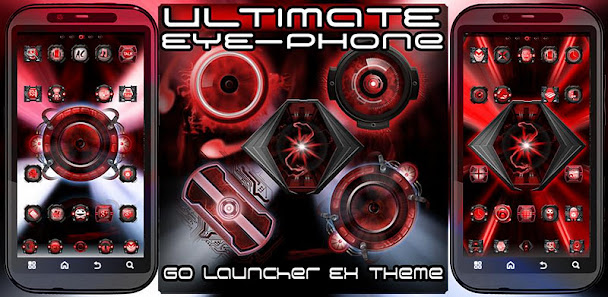
Overview: This awesome new theme features the iconic DROID style eyes (RAZR, BIONIC, DX/DX2, D3, INCREDIBLE), completely redesigned 100% from scratch in a brand new ultimate style (see support website for comparisons), with stunning backgrounds and amazing effects. More custom eye designscoming soon!
Features :
Ultimate EYE Phone GO Launcher v1.0 apk
* Exclusive wallpaper set includes two ‘Ultimate RAZR Eye’ wallpapers, two ‘Ultimate Bionic Eye’ wallpapers, two ‘Ultimate DX / DX2 Eye’ wallpapers, two ‘Ultimate Incredible Eye’ wallpapers, and two ‘Ultimate D3 Eye’ wallpapers. Even more styles coming soon!
* This theme includes a Wallpaper Picker app for quick and easy wallpaper switching, simply press Menu > Wallpapers > Ultimate EYE-Phone Wallpapers > Set Wallpaper.
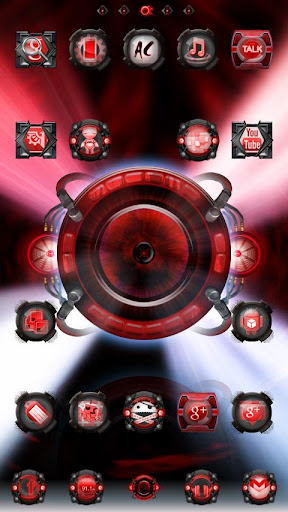
* Over 250 custom designed, ultra red ‘Ultimate EYE-cons’ featured in the icon pack. Each special themed icon is encapsulated within a custom ‘Ultimate RAZR Eye’, ‘Ultimate DX / DX2 Eye’, ‘Ultimate Incredible Eye’, ‘Ultimate Bionic Eye’, and ‘Ultimate D3 Eye’ style icons.
* All other icons are custom designed to appear flawlessly INSIDE five custom designed RAZR eye, Bionic eye, DX / DX2 eye, Incredible eye, and D3 eye icons.
* Totally re-designed ‘Ultimate Eye Phone’ app drawer with tabs which glow when pressed with TEN custom designed app drawer backgrounds.
* NINE different custom designed dock bars in multiple styles and colors for ultimate customization.
DIRECTIONS & INSTRUCTIONS
This is a theme (like a skin) for GO Launcher EX, it will not open on its own. You must install the free home screen app “GO Launcher EX” and apply it.
To apply theme:
Open GO LAUNCHER EX > Press Menu > Themes > Ultimate EYE-Phone Theme > Apply
To change Wallpaper:
Press Menu > Wallpaper > Ultimate EYE-Phone Wallpaper
To change Dock Bar:
Press Menu > Pref > Character settings > Backgrounds > Dock Background > GO Theme BG
To change App Drawer background:
Press Menu > Pref > Character settings > Backgrounds > App Drawer Background > GO Theme BG
To create icon effects (as seen in screenshots):
First, set the scrolling to either horizontal or vertical (this changes which effects are available):
Press Menu > Pref > App Drawer settings > Scrolling orientation > Horizontal/Vertical
Then, choose an icon effect:
Press Menu > Pref > Effects settings > Horizontal scroll effect or Vertical scroll effect
Free Ultimate EYE Phone GO Launcher v1.0 apk

Tags: android, apk, apps, download, free, free android apk, free android apps, Free Ultimate EYE Phone GO Launcher android app apk, Free Ultimate EYE Phone GO Launcher app apk download, Ultimate EYE Phone GO Launcher v1.0 android app apk, Ultimate EYE Phone GO Launcher v1.0 app apk download
Get Updates
Subscribe to our e-mail newsletter to receive updates.
<form class="subscribe-form" action="http://feedburner.google.com/fb/a/mailverify" method="post" target="popupwindow" onsubmit="window.open('http://feedburner.google.com/fb/a/mailverify?uri=', 'popupwindow', 'scrollbars=yes,width=550,height=520');return true">>
<input class="email" type="text" name="email" value="E-mail" onfocus="if (this.value == 'E-mail') {this.value = '';}" onblur="if (this.value == '') {this.value = 'E-mail';}">/></input><input type="hidden" value="" name="uri">/></input><input type="hidden" value="" name="title">/></input><input type="hidden" name="loc" value="en_US">/></input><input class="button" type="submit" name="submit" value="Submit">/></input>
</form>
Share This Post
Tweet
No comments:
Post a Comment